Is my site compromised?
 By Rahul Sahu7 min readUpdated
 The fastest honest answer to “is my site compromised” is a scan of the page itself: seven security blacklists, the scripts the page loads and the domains behind them, hidden iframes, and the CMS and plugin versions it exposes. That takes about a minute and needs no account.
Two things to know before you read the result. A finding on any one of those checks is worth acting on. A clean result is not a clean bill of health — an external scan cannot see server-side code, so the rest of this page covers what to check yourself and where the boundary sits.
Before you change anything, find out what Google is seeing
Most of the time spent on this problem goes into guessing which file is infected. A scan of the exact landing URL in your ad answers that in under a minute, with no account and no card.
Enter your website URL to scan
- No installation required
- Instant results
- Private & Secure
- Google Safe Browsing plus six other blacklists
- Injected scripts and hidden iframes on the page
- Third-party scripts loaded from domains you did not add
- CMS, theme, and plugin versions the page exposes
What a blacklist result tells you
The scan checks your domain against seven lists: Google Safe Browsing, McAfee, Norton Safe Web, PhishTank, Yandex, Opera, and Spamhaus. Each is maintained separately, on its own crawl schedule, with its own signatures. That independence is the useful part and also the confusing part.
| Result | What it means | What to do |
|---|---|---|
| Listed by one or more | At least one engine has evidence. Being listed by exactly one is not a milder version of the problem — it usually just means the others have not recrawled yet. | Treat it as confirmed. Find the payload before you request any delisting. |
| Clean on all seven | Nothing is currently listed. It is not a certificate of health — a fresh injection can be days ahead of every list. | Keep going. Check the script list and the self-checks below. |
| Clean here, flagged in Google Ads | Normal. The ad crawler and Safe Browsing are different systems and do not share a verdict. | Trust the Ads finding and work from the script list. |
Blacklists lag in both directions
They are slow to list a new infection and slow to delist a cleaned site. If you cleaned the site yesterday and a list still shows you, that is expected. If you have never been hacked and a list shows you, check whether the domain had a previous owner.
Four checks you can run yourself in two minutes
Do these alongside the scan. They catch the conditional payloads an automated check can miss, because you control the conditions.
View source and read the bottom
Not the rendered DOM — the raw source. Scroll past the closing body tag. Injected script blocks are usually appended after everything legitimate, and they look wrong immediately: one enormous line, hex or base64 strings, no formatting.
Visit as a stranger from a search engine
Private window, mobile user agent, arriving via a Google result for your own brand rather than typing the URL. A large share of injections check the referrer and skip direct visits — which is exactly how you have been testing.
Search your own site in Google
A
site:query for your domain. Pages you never created, in languages you do not publish in, around pharma, loans, or streaming, mean someone has been generating content on your server.Open Search Console → Security issues
If the property is verified, this names affected URLs and the category Google assigned. Nothing listed is not proof of health, but anything listed is authoritative.
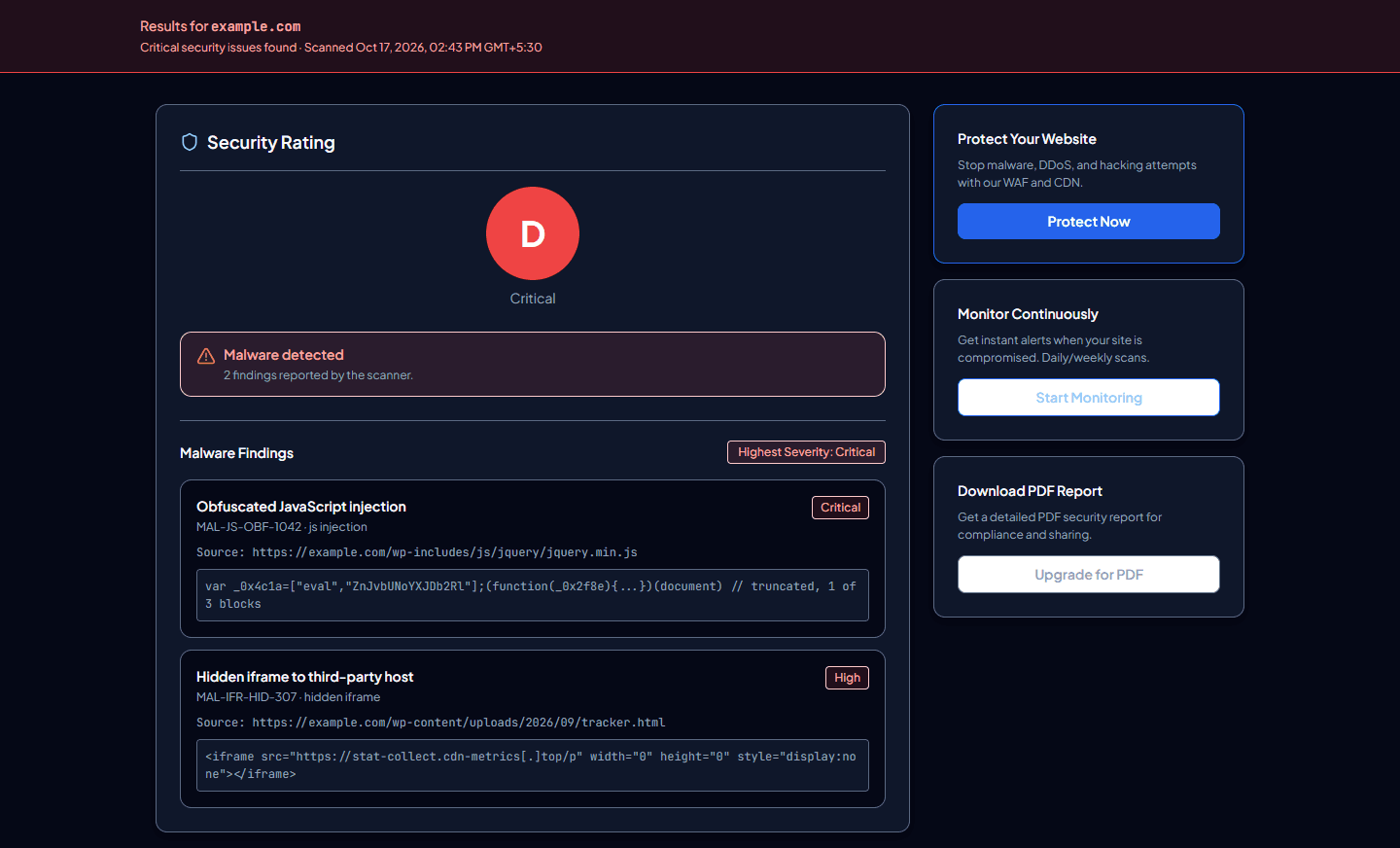
Reading the findings in a scan result
Four categories, and they do not deserve equal weight. Here is what each one should make you do next.
| Finding | How seriously to take it |
|---|---|
| Hidden iframe | High. A zero-size or off-screen iframe loading a domain you do not recognise has almost no legitimate use on a business page. |
| Script from an unexpected domain | Depends entirely on the domain. Your analytics and chat vendors belong there. A domain you cannot identify, or one that looks like a near-miss of a real brand, does not. |
| Suspicious pattern inside a script | High if it sits in a file you own, because it should not be there. Lower if it is inside a minified vendor bundle — check the vendor, and check whether that version is current. |
| Outdated CMS, theme, or plugin version | Not evidence of a compromise, but it is the usual way in, and Google names an exploited vulnerable CMS as a trigger for its compromised-site policy. Update regardless of what else the scan found. |
SSL and WHOIS details in the same result are context, not infection signals. An expiring certificate or a recently-transferred domain is worth knowing about; neither one gets your ads disapproved on its own.
The scan is clean and you still think something is wrong
Trust that instinct over the clean result, because an external scan has a hard boundary. It sees what a visitor's browser sees. It cannot see:
- Server-side code. A PHP backdoor that only responds to a specific request parameter produces no symptom in a normal page load.
- Files that exist but are not loaded by the page you scanned. A shell in an uploads directory is invisible until something calls it.
- Other pages. Mass injections across a CMS hit database-stored content, so the page you checked can be the one clean page on the site.
- Scheduled tasks and mail queues. A site being used to send spam often looks completely normal to a visitor.
What closes that gap needs server access: file integrity against a known-good copy, access logs around the first odd behaviour, the cron table, and the list of admin users. Scan several URLs rather than one — the homepage, the ad landing pages, and anything with a form on it.
If it is compromised: the first hour
Order matters here, and the instinct to delete first is the one to resist.
Copy everything before you change it
Files and database. This is your rollback, and it is also the only record of how the entry point worked once you have cleaned it.
Rotate credentials and kill sessions
CMS admins, database, hosting panel, SFTP keys, and the framework secrets that sign sessions. Remove admin accounts you cannot account for. Cleaning files while the attacker still holds a password buys you hours.
Remove the payload, then find the entry point
Both halves, in that order, in the same sitting. The payload is the symptom; the vulnerable plugin or leaked key is the cause. Sites that reinfect are sites where the second half never happened.
Update the whole stack
Core, themes, plugins, and anything your server runs. Google's Help for Hacked Websites walks through this for the common platforms.
Re-scan, then request reviews
Search Console Security Issues for Google's index, Safe Browsing site status to confirm the browser warning has cleared, and each blacklist that listed you. Request these only after the scan comes back empty.
If Google Ads disapproved your ads over this, the ordering has one extra constraint worth knowing before you appeal — see the compromised site disapproval guide and the appeal guide.
Checking once is not the same as knowing
A scan is a snapshot. The reason compromises get discovered by a disapproved ad or a browser warning rather than by the owner is that nobody was looking between the two moments when it mattered.
The earliest signal available from outside a server is a change in the script list — a new domain appearing in what your page loads. That shows up before a blacklist entry and well before an ads disapproval. Malspy can scan a domain on a schedule and alert when something changes, which is the version of this that does not rely on remembering.
Frequently asked questions
- How do I know if my website is hacked?
The reliable signals are external: your domain appearing on a security blacklist, Search Console reporting a security issue, scripts loading from domains you did not add, hidden iframes in the page source, or pages indexed under your domain that you never created. Slow loading and unexpected redirects are worth investigating but have innocent explanations too.
- The scan says clean. Is my site definitely safe?
No, and that distinction is worth keeping. A clean external scan means nothing was detectable from outside on the URL you checked, at that moment. Server-side backdoors, unloaded files, and other pages are all outside what any external scanner can reach.
- Why is only one blacklist flagging my site?
Because each list crawls on its own schedule. One listing usually means the others have not caught up yet, not that the finding is weak. Act on it as though all seven had listed you.
- Do I need to pay someone to clean it?
Not always. With server access, a pre-infection backup, and an injection sitting in page markup or a known-bad plugin, this is often a few hours of work. Pay for help when you cannot find the entry point, have no clean backup, or the site reinfects after you clean it — the last one meaning the backdoor is still there.
- How long until browser warnings and blacklist entries disappear?
No published timeline, and it differs per provider. What you control is submitting a review request to each one after the site is genuinely clean, and not before — a review requested on a still-infected site resets your position in the queue.
- My Google Ads says "compromised site" but every check here is clean. Why?
Usually because the ad crawler fetched the exact landing URL with a query string, from a different region, as a first-time visitor — conditions that trigger payloads a normal check skips. Scan that precise URL rather than the homepage, and read the Policy Manager string to confirm which policy it is.